 TutorialKart.com
What is Data Warehouse?
A data warehouse is a central repository that stores integrated, cleaned, and historical data from different business systems. It is mainly used for reporting, querying, business intelligence, trend analysis, and managerial decision-making.
In simple terms, a data warehouse takes data from sources such as sales applications, billing systems, customer databases, inventory tools, web analytics, and spreadsheets, then organises that data into a consistent format so that users can analyse it reliably.
A data warehouse is different from a normal operational database. An operational database records day-to-day transactions, while a data warehouse is designed to answer analytical questions such as “Which product category performed best over the last three years?” or “Which region has the highest repeat customers?”
Data Warehouse definition
A data warehouse is a subject-oriented, integrated, time-variant, and non-volatile collection of data used to support analysis and decision-making.
According to Bill Inmon, Data warehouse is a Subject-Oriented, Integrated, time-variant and non-volatile collection of data.
According to Ralph kimball, Data Warehouse is a transaction data specifically structured for query and analysis.
These two definitions are widely used in data warehousing. Inmon explains the core properties of a data warehouse, while Kimball focuses on how transaction data is structured for query and analysis.
Data, information, and decision-making in a data warehouse
Data is raw material. For example, invoice numbers, product codes, customer IDs, order dates, and payment values are data points. When these data points are cleaned, combined, summarised, and arranged in a meaningful way, they become information.
To make a business decision, an organisation usually follows this flow: collect data, convert it into information, analyse the information, and then decide what action to take.

Example: In an organisation, different departments such as Sales, Product, HR, Finance, and Support generate their own data. Before launching a new product, the management may need sales history, product demand, customer feedback, and profit margin information. A data warehouse helps bring these inputs together for analysis.
Operational data store, OLTP database, and data warehouse
In an organisation, each department performs different transactions. These transactions are usually saved in an operational database or an operational data store. Such systems are designed for fast transaction processing, not for long analytical queries.
An OLTP system, or Online Transaction Processing system, is used for daily business operations. Examples include creating an order, updating a bank account balance, recording attendance, or generating an invoice. The data in these systems changes frequently.
A data warehouse is used for OLAP, or Online Analytical Processing. It supports analysis over large volumes of historical data. Instead of frequently updating individual transactions, it stores data snapshots and facts that can be queried for reports and trends.
Example: If a retail company wants to analyse product sales for the last five years, the operational system may not be suitable because it is optimised for current transactions. A data warehouse can store historical sales data and make such long-term analysis easier.
Why Data Warehousing is required?
Data warehousing is required when an organisation needs consistent, historical, and analysis-ready data from multiple systems. Without a data warehouse, teams may prepare reports from separate databases, spreadsheets, or applications, which can lead to inconsistent results.
For example, in banking, data may come from accounts, loans, cards, mutual funds, digital channels, and customer service systems. Each system records a different part of the business. A data warehouse brings the required data together so that users can analyse customer behaviour, product performance, risk, profitability, and compliance-related reports.
- It centralises data from multiple operational databases and applications.
- It stores historical data for long-term trend analysis.
- It improves consistency by applying standard formats, definitions, and business rules.
- It separates analytical workloads from transaction systems.
- It supports dashboards, scheduled reports, ad hoc queries, and business intelligence tools.
Characteristics of Data Warehouse (DWH)
The four main characteristics of a data warehouse are subject orientation, integration, time variance, and non-volatility. These characteristics explain why a data warehouse is suitable for analysis rather than routine transaction processing.
- Subject oriented: Data is organised around major business subjects such as customers, products, sales, suppliers, accounts, or claims instead of being organised only around individual applications.
- Integrated: Data from different systems is standardised. For example, one system may store gender as M/F, another as Male/Female, and another as 1/2. A data warehouse applies a consistent format.
- Time variant: A data warehouse stores data with a time dimension, such as day, month, quarter, or year. This makes it possible to compare performance across time periods.
- Non-volatile: Once data is loaded into the data warehouse, it is generally not changed by normal business transactions. New data is added through scheduled loads or pipelines.
- Historical: A data warehouse keeps past data along with current data, so users can analyse changes, patterns, and trends over months or years.
Main components of a data warehouse
A data warehouse environment usually contains several connected components. The names may differ across tools and platforms, but the basic flow remains similar.
- Source systems: Operational databases, CRM systems, ERP systems, flat files, cloud applications, logs, and external data feeds.
- Data ingestion layer: ETL or ELT pipelines that extract data, move it, and prepare it for storage and analysis.
- Staging area: A temporary area where raw data can be validated, cleaned, transformed, and checked before loading.
- Warehouse storage: The central database or cloud warehouse where cleaned and structured data is stored.
- Metadata and governance: Definitions, data lineage, quality rules, access controls, and documentation that help users trust the data.
- BI and reporting layer: Dashboards, reports, analytical queries, and visualisation tools used by business users and analysts.
ETL and ELT in data warehouse loading
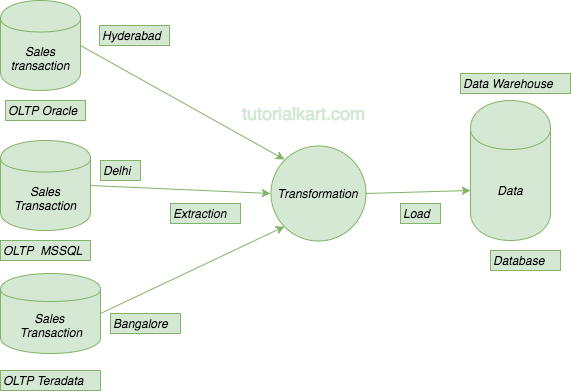
Data must be moved from source systems into the data warehouse. This is commonly done using ETL or ELT.
- ETL means Extract, Transform, Load. Data is extracted from source systems, transformed before loading, and then inserted into the warehouse.
- ELT means Extract, Load, Transform. Data is extracted and loaded first, and transformations are performed inside the warehouse platform.
Traditional on-premise data warehouses often used ETL. Many modern cloud data warehouse platforms support ELT because they can process large volumes of data after it is loaded.
Types of data warehouse used in organisations
Data warehouse types are usually classified by scope, ownership, and usage. The most common types are enterprise data warehouse, operational data store, data mart, and cloud data warehouse.
- Enterprise data warehouse: A central warehouse that serves the whole organisation and stores data across many departments or subject areas.
- Data mart: A smaller warehouse-like structure focused on a department or business function, such as sales, finance, or marketing.
- Operational data store: A store that combines current operational data from multiple systems for near-current reporting. It is not the same as a long-term historical data warehouse.
- Cloud data warehouse: A warehouse hosted on cloud infrastructure, often used when organisations need scalable storage and compute for analytics.
Data warehouse architecture: basic flow from source to report
A simple data warehouse architecture can be understood as a pipeline. Data begins in source systems, passes through ingestion and transformation, is stored in the warehouse, and is finally used by reporting or analytics tools.
Source Systems → Staging Area → ETL/ELT Processing → Data Warehouse → Data Marts/BI ReportsIn a larger implementation, this architecture may also include a data lake, master data management, semantic layer, data quality checks, scheduling tools, monitoring, and role-based access control.
Data warehouse schema design: fact tables and dimension tables
Data warehouses often use dimensional modelling. In this approach, measurable business events are stored in fact tables, while descriptive information is stored in dimension tables.
- Fact table: Stores numeric measures such as sales amount, quantity, discount, profit, balance, or transaction count.
- Dimension table: Stores descriptive attributes such as product name, customer segment, city, branch, employee, date, or category.
For example, a sales fact table may store order amount and quantity, while product, customer, store, and date dimension tables describe the sales event.
SELECT
    d.year,
    p.category,
    SUM(f.sales_amount) AS total_sales
FROM fact_sales f
JOIN dim_date d ON f.date_key = d.date_key
JOIN dim_product p ON f.product_key = p.product_key
GROUP BY d.year, p.category;
This type of query is typical in a data warehouse because it summarises historical business activity across dimensions such as time and product category.
Relational Database types for data warehouse storage
A data warehouse may be built on different database technologies depending on data volume, query workload, budget, and scalability needs. Older classifications often group databases by storage capacity, but modern decisions also consider cloud scalability, workload isolation, security, and integration with analytics tools.
- Low range database: Used for small datasets and simple reporting. Examples include Microsoft Access and similar desktop database tools.
- Mid range database: Used for larger departmental or enterprise workloads. Examples include Oracle, Microsoft SQL Server, IBM Db2, PostgreSQL, and MySQL-based systems.
- High range database: Used for very large data warehouse workloads that may involve terabytes or petabytes of data. Examples include enterprise appliances and modern cloud data warehouse platforms.
How to choose a database for a data warehouse
To choose the right database for a data warehouse, consider the size of the organisation, daily transaction volume, reporting complexity, expected history period, user concurrency, security needs, and total cost of ownership.
- Data volume: Estimate current data size and expected growth for the next few years.
- Query performance: Check whether the platform can run aggregations, joins, and historical reports efficiently.
- Scalability: Decide whether the system must scale storage and compute as data grows.
- Availability: Ensure that reports remain available when users need them.
- Security: Support role-based access, encryption, auditing, and separation of sensitive data.
- Integration: Confirm that the platform works with ETL/ELT tools, BI tools, data catalogues, and existing source systems.
- Cost: Compare licensing, storage, compute, maintenance, administration, and migration cost.
How to build Data Warehouse?
To build a data warehouse, start with business questions, source systems, and data quality requirements. Do not begin only by choosing a database. A useful data warehouse depends on correct data definitions, reliable pipelines, good modelling, and clear governance.
- Define analytical requirements: Identify reports, dashboards, KPIs, users, and decisions the data warehouse must support.
- Identify source systems: List the applications, databases, files, and external feeds that provide the required data.
- Design the data model: Decide subject areas, fact tables, dimension tables, keys, history handling, and business definitions.
- Create ingestion pipelines: Use ETL or ELT to extract, clean, transform, and load data into the warehouse.
- Apply data quality checks: Validate duplicates, missing values, inconsistent formats, referential integrity, and rejected records.
- Set access and governance: Define roles, permissions, sensitive fields, audit needs, and ownership for each data area.
- Connect BI tools: Build reports, dashboards, and semantic layers for business users.
- Monitor and improve: Track load failures, query performance, cost, data freshness, and user feedback.
The database selected for a data warehouse should support large storage, parallel processing, strong query optimisation, backup and recovery, high availability, and secure access control. For large systems, distributed storage and scalable compute are also important.
Benefits and limitations of data warehousing
A data warehouse can improve reporting and decision-making, but it also requires planning and maintenance. It is useful to understand both sides before implementation.
- Benefits: Better historical analysis, consistent reporting, faster analytical queries, reduced load on operational systems, and a single trusted view of business data.
- Limitations: Setup effort, data quality challenges, integration complexity, governance requirements, storage cost, and the need to maintain pipelines as source systems change.
Data warehouse example in retail business
Consider a retail business with physical stores and an online store. Sales transactions are recorded in a billing system, customer data is stored in a CRM, inventory data is stored in a stock management system, and marketing campaign data is stored in a marketing tool.
A data warehouse can combine these datasets and help answer questions such as which products sell more during festivals, which stores have slow-moving inventory, which campaigns bring repeat customers, and how sales compare across regions and time periods.
Data warehouse references and further reading
For additional reference, you may compare this overview with vendor-neutral and cloud platform explanations from IBM on data warehouse concepts, AWS on data warehouses, and Microsoft Azure on data warehouse basics.
Frequently asked questions about Data Warehouse
What are the 4 main characteristics of a data warehouse?
The four main characteristics of a data warehouse are subject-oriented, integrated, time-variant, and non-volatile. These properties mean that the warehouse is organised around business subjects, combines data from multiple sources, keeps time-based history, and is not updated like a normal transaction database.
What are the 4 common types of data warehouses?
The common types are enterprise data warehouse, data mart, operational data store, and cloud data warehouse. An enterprise data warehouse serves the whole organisation, a data mart serves a department, an operational data store supports current operational reporting, and a cloud data warehouse runs on cloud infrastructure.
What are the main components of a data warehouse?
The main components are source systems, data ingestion or ETL/ELT pipelines, staging area, warehouse storage, metadata and governance, and BI or reporting tools. Together, these components move raw data into an analysis-ready form.
How is a data warehouse different from an operational database?
An operational database supports daily transactions such as orders, payments, and updates. A data warehouse supports analysis, reporting, and decision-making using integrated and historical data from multiple systems.
Is a data warehouse the same as a data mart?
No. A data warehouse usually covers the whole organisation or many subject areas. A data mart is smaller and focuses on a specific department or function, such as sales, finance, marketing, or HR.
Data warehouse tutorial QA checklist
- Check that the definition explains subject-oriented, integrated, time-variant, and non-volatile data clearly.
- Verify that OLTP, ODS, OLAP, and data warehouse are not described as the same system.
- Confirm that the tutorial explains components such as source systems, ETL/ELT, staging, warehouse storage, metadata, governance, and BI tools.
- Review examples to ensure they show historical analysis rather than only day-to-day transaction processing.
- Ensure new links, images, and code blocks are relevant to data warehouse learning and do not change the existing image URLs.