 TutorialKart.com
Salesforce Tutorial – Learn Salesforce Admin and Developer Basics
This Salesforce tutorial is written for beginners who want a clear path into Salesforce administration, Salesforce development, Apex, SOQL, Visualforce, and CRM basics. Start with the platform concepts, then move into admin setup, automation, data model, security, and developer topics with small practical examples.
Salesforce can be learned in two parallel tracks. The administrator track focuses on setup, users, security, reports, objects, fields, flows, and business configuration. The developer track focuses on Apex, SOQL, Lightning components, integrations, and custom application logic.
Why Salesforce CRM is used in business applications
Salesforce.com is a cloud-based customer relationship management platform used to manage customer data, sales activities, service requests, marketing processes, collaboration, reports, and custom business applications. It provides Salesforce automation, customer service tools, social collaboration features, and platform tools to build Salesforce custom application.
At a basic level, Salesforce stores business information as records. Users work with objects such as Accounts, Contacts, Leads, Opportunities, Cases, and custom objects. Teams can then use this data to track sales pipelines, support customers, create reports, and automate repeated business steps. This is why Salesforce is commonly described as a customer relationship management (CRM) tool.
Salesforce Tutorial Roadmap for Beginners
Tutorialkart.com provides a free Salesforce tutorial for beginners who want to understand Salesforce admin and Salesforce developer topics in a step-by-step order. Instead of learning random topics, follow the roadmap below so that each topic builds on the previous one.
- Understand cloud computing, CRM, Salesforce orgs, apps, tabs, objects, fields, and records.
- Learn Salesforce administrator basics such as company settings, user management, profiles, roles, permission sets, object permissions, field-level security, page layouts, list views, and reports.
- Practice Salesforce data model topics such as standard objects, custom objects, lookup relationships, master-detail relationships, validation rules, and schema design.
- Learn automation using Flow, approval processes, email alerts, scheduled actions, and record-triggered logic.
- Move into developer topics such as Apex, SOQL, SOSL, triggers, Visualforce, Lightning Web Components, APIs, and deployment basics.
- Use Trailhead-style hands-on practice and small real examples to connect theory with actual Salesforce screens.
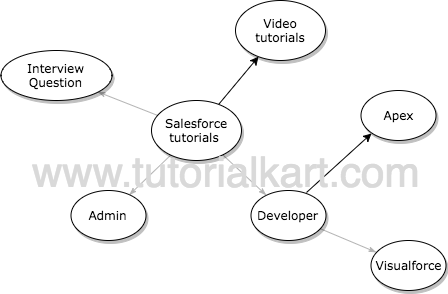
Our main motive is to deliver a useful Salesforce tutorial to students with training materials and interview questions. We divided the Salesforce tutorial into two parts: Salesforce Admin tutorial and Salesforce Developer tutorial.
Salesforce admin tutorial topics to learn first
A Salesforce administrator is responsible for configuring Salesforce so that users can work efficiently and safely. Admin work includes creating users, assigning permissions, building objects and fields, maintaining data quality, creating reports and dashboards, managing automation, and helping teams use Salesforce correctly.
For beginners, Salesforce admin learning should start with Setup, user management, the data model, security, and reports. After that, learn automation with Flow because many modern Salesforce business processes can be built without writing Apex code.
| Salesforce admin area | What to learn | Practice task |
|---|---|---|
| Org and app basics | Apps, tabs, objects, records, Setup menu | Create a simple custom app with two custom objects |
| User access | Users, profiles, permission sets, roles | Create a test user and assign correct object access |
| Data model | Fields, relationships, validation rules | Create Account-related custom records with required fields |
| Automation | Record-triggered flows, approvals, email alerts | Build a flow that updates a field when a record changes |
| Analytics | Reports, dashboards, filters, folders | Create a pipeline report and a dashboard component |
Salesforce developer tutorial topics after admin basics
A Salesforce developer works on custom application logic and platform development. Developer work may include analysis, design, coding, testing, debugging, deployment, and maintenance of Salesforce applications. A beginner should first understand the admin side of Salesforce, because Apex code, SOQL queries, and Lightning components depend on the Salesforce data model and security model.
The core developer topics are Apex classes, Apex triggers, SOQL, SOSL, Lightning Web Components, Visualforce for legacy pages, REST and SOAP APIs, test classes, governor limits, and deployment using change sets or Salesforce CLI.
SELECT Id, Name, Industry
FROM Account
WHERE Industry = 'Technology'
LIMIT 10
The example above is a simple SOQL query. SOQL looks similar to SQL, but it is written for Salesforce objects and fields. Learn SOQL early because Apex, reports, integrations, and debugging often require a clear understanding of how Salesforce data is queried.
Free Salesforce Tutorial Lessons
Use the following lesson groups to move through the Salesforce tutorial in a practical order. Start with administrator lessons even if your final goal is development, because developers also need to understand objects, fields, relationships, permissions, and business processes.
- Salesforce administrator Tutorial.
- Salesforce developer tutorial.
- Salesforce Apex tutorial.
- Salesforce SOQL tutorial.
- Salesforce Visualforce tutorial.
How to learn Salesforce without getting lost
If you are confused about how to get started with Salesforce.com, begin with basic cloud computing and CRM concepts. Then create a free practice org or Trailhead playground and repeat each topic inside the Salesforce interface. Reading alone is not enough for Salesforce because most concepts are easier to understand when you create records, change settings, and test user access yourself.
- For the first week, learn the Salesforce interface, apps, tabs, objects, records, and Setup menu.
- Next, practice users, profiles, roles, permission sets, sharing settings, and field-level security.
- Then build a small app with custom objects, fields, page layouts, validation rules, and reports.
- After the admin foundation, learn Flow and basic automation before writing Apex triggers.
- When you start development, learn SOQL before Apex triggers so that you understand how data is fetched and updated.
Salesforce admin vs Salesforce developer learning path
| Learning path | Main focus | Beginner topics | Later topics |
|---|---|---|---|
| Salesforce Administrator | Configuration and business process setup | Users, security, objects, fields, reports, dashboards | Flow, approval processes, data management, release management |
| Salesforce Developer | Custom code and platform development | Data model, SOQL, Apex basics, test classes | Triggers, LWC, APIs, integrations, deployment tools |
| Salesforce Consultant | Business analysis and solution design | CRM process, requirements, Salesforce features | Implementation planning, stakeholder mapping, solution documentation |
Salesforce practice checklist for beginners
Use this checklist after completing the first set of Salesforce tutorial lessons. It helps you confirm that you are learning practical skills instead of only memorising definitions.
- Create a custom object, add fields, and enter sample records.
- Create a lookup relationship and explain how it differs from a master-detail relationship.
- Create two users with different access levels and test what each user can see.
- Create a validation rule and test both a valid and invalid record.
- Create a report, add filters, and place it on a dashboard.
- Build one simple Flow that updates a field automatically.
- Write one basic SOQL query using SELECT, FROM, WHERE, and LIMIT.
Salesforce Interview Questions and revision practice
Salesforce Interview questions are useful after you understand the concepts behind the answers. Do not depend only on memorised questions. For each interview topic, first learn the concept, then practice it in a Salesforce org, and then revise common questions.
Older practice resources such as Salesforce dumps and Interview Questions may help you identify repeated topics, but your main preparation should be based on current Salesforce product behaviour and hands-on practice. At the end of every Salesforce tutorial, Salesforce Interview question practice can be used for revision.
Common mistakes while learning Salesforce
- Starting Apex before understanding objects, fields, relationships, and permissions.
- Ignoring security settings and assuming that every user can see every record.
- Learning only definitions without creating records and testing setup changes.
- Using automation without checking whether Flow can solve the requirement before code.
- Not writing test classes while learning Apex development.
- Mixing Salesforce terminology with general SQL or programming terminology without understanding Salesforce-specific rules.
Topic-specific QA checklist for this Salesforce tutorial page
- Does the page clearly separate Salesforce admin, developer, Apex, SOQL, and Visualforce learning paths?
- Does the tutorial explain CRM, objects, records, users, security, automation, and reports before developer topics?
- Are beginners told to practice in a Salesforce org instead of only reading theory?
- Are the Salesforce tutorial links still visible and unchanged from the original page?
- Are code examples marked with the correct PrismJS language class?
- Do the FAQ answers address beginner doubts about Salesforce learning order, admin work, developer work, and SOQL?
Salesforce tutorial FAQs for beginners
What should I learn first in a Salesforce tutorial?
Start with CRM basics, Salesforce navigation, apps, tabs, objects, fields, and records. After that, learn users, profiles, roles, permission sets, reports, dashboards, and Flow. Developer topics such as Apex and SOQL are easier when the admin foundation is clear.
Is Salesforce admin easier to start than Salesforce development?
For most beginners, Salesforce admin topics are easier to start because they use configuration screens before code. Salesforce development requires admin knowledge plus programming concepts such as classes, queries, triggers, tests, and deployment.
Do I need coding knowledge to learn Salesforce?
You do not need coding knowledge for the basic Salesforce administrator path. You need coding knowledge when you move into Apex, Lightning Web Components, integrations, and advanced custom development.
Why is SOQL important in Salesforce development?
SOQL is used to query Salesforce records from objects such as Account, Contact, Opportunity, and custom objects. Apex developers use SOQL frequently, so it should be learned before writing complex triggers or controller logic.
How can I practice Salesforce after reading tutorials?
Create a practice org, build a small app, add custom objects and fields, create users with different permissions, build reports, create one Flow, and write simple SOQL queries. Practical setup work helps you understand how Salesforce behaves for real users.