 TutorialKart.com
Dart For Loop
A Dart for loop repeats a block of statements while a condition remains true. It is commonly used when the number of iterations is known, such as printing a sequence, processing list elements by index, or calculating a factorial.
In this tutorial, you will learn the syntax, execution order, and practical use of the Dart for loop. You will also see examples of a standard loop, a nested loop, list iteration, and loop-control statements.
Syntax of Dart For Loop
Following is the syntax of For Loop in Dart programming language.
 for (initialization; boolean_expression; update) {
     //statement(s)

 }
The three expressions inside the parentheses control the loop:
initializationruns once before the loop begins. It usually declares and initializes a loop variable.boolean_expressionis checked before every iteration. The loop body runs only when this expression evaluates totrue.updateruns after each iteration. It commonly increments or decrements the loop variable.
Any variable declared in the initialization section, such as var i = 0, is normally available only within the loop.
How a Dart For Loop Executes
- When the program control comes to a for loop statement, it executes the initialization block.
- And then evaluates the
boolean_expression.- If
boolean_expressionevaluates totrue,- then the statements inside the for loop are executed.
- And then the update section is executed.
- Now go to step 2.
- If
boolean_expressionevaluates tofalse, - Go out of the loop.
- If
For example, in for (var i = 1; i <= 3; i++), Dart initializes i to 1, checks whether i <= 3, runs the loop body, increments i, and repeats the condition check.
Dart For Loop to Print Numbers from 1 to 5
The following example shows the basic execution of a Dart for loop.
void main() {
  for (var i = 1; i <= 5; i++) {
    print(i);
  }
}
The loop starts with i = 1. After each number is printed, i++ increases its value by one. Execution stops when i becomes 6, because the condition i <= 5 is then false.
1
2
3
4
5
Dart For Loop to Calculate Factorial of a Number
In the following example, we will use Dart For Loop to calculate the factorial of a given number.
Dart program
void main(){
	var n = 6;
	var factorial = 1;

	//for loop to calculate factorial
	for(var i=2; i<=n; i++) {
		factorial = factorial*i;
	}

	print('Factorial of ${n} is ${factorial}');
}
The variable factorial begins at 1. The loop multiplies it successively by every integer from 2 through n. For n = 6, the calculation is 1 × 2 × 3 × 4 × 5 × 6.
Output
Factorial of 6 is 720Iterating Through a Dart List with a For Loop
An index-based for loop is useful when you need both the list element and its position.
void main() {
  var fruits = ['Apple', 'Banana', 'Mango'];

  for (var i = 0; i < fruits.length; i++) {
    print('Index $i: ${fruits[i]}');
  }
}
Index 0: Apple
Index 1: Banana
Index 2: MangoDart list indexes begin at 0. Therefore, the condition uses i < fruits.length rather than i <= fruits.length. Using <= would eventually try to access an index outside the list.
Dart Nested For Loop
You can write a For Loop inside another For Loop in Dart. This process is called nesting. Hence Nested For Loop.
For every single iteration of the outer loop, the inner loop completes all of its iterations. Nested loops are useful for rows and columns, tables, grids, and pattern-printing programs.
Dart Nested For Loop to Print a Star Triangle
In the following example, we will use Dart For Loop to *s in the shape of right angle triangle.
Dart program
import 'dart:io';

void main(){
	var n = 6;

	print('');

	for(var i=1; i<=n; i++) {
		for(var j=0; j<i; j++) {
			stdout.write(' *');
		}
		print('');
	}
}
The outer loop controls the number of rows. The inner loop prints the required number of stars in each row. When i is 1, one star is printed; when i is 2, two stars are printed, and so on.
Output
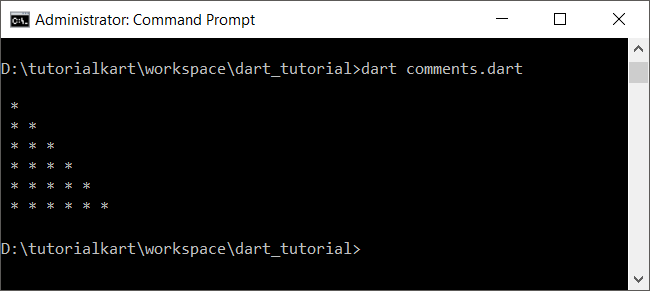
Note: Here we used stdout.write() to write to console without new line at the end, unlike print().
Using Break and Continue in a Dart For Loop
The break statement exits the loop immediately. The continue statement skips the remaining statements in the current iteration and proceeds to the next iteration.
void main() {
  for (var i = 1; i <= 10; i++) {
    if (i == 3) {
      continue;
    }

    if (i == 7) {
      break;
    }

    print(i);
  }
}
1
2
4
5
6The value 3 is not printed because continue skips that iteration. The loop ends when i reaches 7 because break exits the loop before the print statement.
Common Dart For Loop Errors
- Off-by-one condition: Use
i < list.lengthfor list indexes, noti <= list.length. - Missing update expression: If the condition remains true and the loop variable never changes, the loop may run indefinitely.
- Wrong increment direction: A loop that starts high and counts down should usually use
i--with a matching condition. - Changing a list while indexing it: Adding or removing elements during iteration can change indexes and produce unexpected results.
Dart For Loop Questions
When should I use a for loop in Dart?
Use a for loop when the initialization, stopping condition, and update can be expressed clearly in one statement. It is especially suitable when the number of iterations is known or when you need an index.
What is the difference between for and for-in in Dart?
A standard for loop gives direct control over initialization, condition, update, and index values. A for-in loop reads each element of an iterable directly and is usually simpler when an index is not needed.
Can the three parts of a Dart for loop be omitted?
Yes. The initialization, condition, and update expressions are optional, but the two semicolons must remain. For example, for (;;) creates an infinite loop and must be stopped with logic such as a break statement.
Can a Dart for loop count backward?
Yes. Initialize the loop variable with a higher value, use a condition that checks the lower limit, and decrement the variable after each iteration.
for (var i = 5; i >= 1; i--) {
  print(i);
}
Dart For Loop Summary
In this Dart Tutorial, we learned the syntax and how to use for loop with the help of example programs.
A Dart for loop runs an initialization once, checks a condition before each iteration, and performs an update after each iteration. Use it for counted repetition, indexed list access, calculations, and nested row-and-column operations.