
In this tutorial, we will write a Python program to check if the given year is a leap year or not. We will use the leap-year divisibility rules with if-else, and then see versions using a function and a for loop.

Python Leap Year Program

A leap year has 366 days instead of 365. In the Gregorian calendar, a year is a leap year when it satisfies either of these conditions:

  • The year is divisible by 400, or
  • the year is divisible by 4 but is not divisible by 100.

For example, 1992 is a leap year because it is divisible by 4 and not by 100. The year 1900 is not a leap year because it is divisible by 100 but not by 400. The year 2000 is a leap year because it is divisible by 400.

Leap Year Conditions in Python

The leap-year rule can be written as the following Python condition.

</>
Copy
(year % 4 == 0 and year % 100 != 0) or (year % 400 == 0)

The modulo operator % gives the remainder after division. Therefore, year % 4 == 0 means that the year is exactly divisible by 4.

The check for divisibility by 100 is necessary because century years are not automatically leap years. A century year must also be divisible by 400. This is why 1900 is not a leap year while 2000 is.

Algorithm to Check a Leap Year in Python

Following is the algorithm that we shall use to check if given input year is leap year or not.

  1. Read an integer from user, to year variable.
  2. Check the condition if year is exactly divisible by 4 and 100, or the year is exactly divisible by 400.
  3. If the above condition returns true, given year is leap year else it is not leap year.

In precise terms, step 2 means: check whether the year is divisible by 4 and not divisible by 100, or whether it is divisible by 400.

Leap Year Program

Python Program

</>
Copy
year = int(input('Enter year : '))

if (year%4 == 0 and year%100 != 0) or (year%400 == 0) :
    print(year, "is a leap year.")
else :
    print(year, "is not a leap year.")

Output
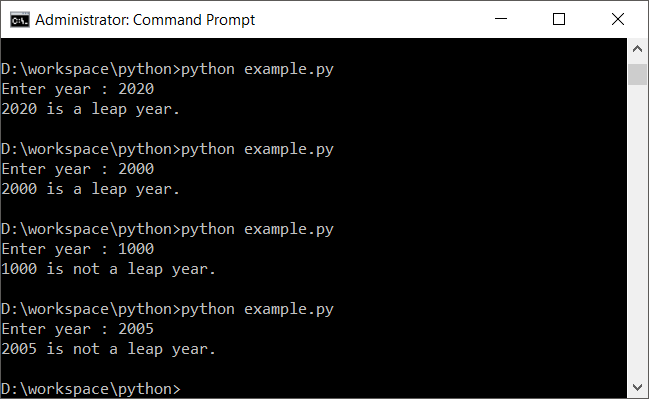
Python - Check Leap Year

The program first converts the entered value to an integer. It then evaluates both parts of the leap-year rule. If either valid condition is true, the program reports that the year is a leap year.

Check 1992, 1900, and 2000 with the Leap Year Rule

These three values demonstrate the parts of the rule that commonly cause confusion.

  • 1992: divisible by 4 and not divisible by 100, so it is a leap year.
  • 1900: divisible by 4 and 100 but not by 400, so it is not a leap year.
  • 2000: divisible by 400, so it is a leap year.
1992 is a leap year.
1900 is not a leap year.
2000 is a leap year.

Leap Year Program in Python Using a Function

If the leap-year check is needed more than once, place the condition inside a function. The function can return True for a leap year and False otherwise.

</>
Copy
def is_leap_year(year):
    return (year % 4 == 0 and year % 100 != 0) or year % 400 == 0


year = int(input("Enter year: "))

if is_leap_year(year):
    print(year, "is a leap year.")
else:
    print(year, "is not a leap year.")

The function separates the leap-year calculation from input and output. This makes the same rule easier to reuse when checking several years.

Leap Year Program in Python Using Nested if-else

The same rule can also be written with nested if-else statements. This version shows the decision process one divisibility test at a time.

</>
Copy
year = int(input("Enter year: "))

if year % 400 == 0:
    print(year, "is a leap year.")
elif year % 100 == 0:
    print(year, "is not a leap year.")
elif year % 4 == 0:
    print(year, "is a leap year.")
else:
    print(year, "is not a leap year.")

Here, years divisible by 400 are accepted first. Other century years are then rejected. Finally, non-century years divisible by 4 are accepted.

Check Leap Years in a Range Using a Python for Loop

A for loop is useful when you need to check several years rather than a single input year. The following program prints all leap years from 2020 through 2040.

</>
Copy
for year in range(2020, 2041):
    if (year % 4 == 0 and year % 100 != 0) or year % 400 == 0:
        print(year)

Output

2020
2024
2028
2032
2036
2040

The range ends at 2041 because the stop value of Python’s range() is excluded.

Common Mistakes in a Python Leap Year Program

  • Checking only divisibility by 4: this incorrectly classifies years such as 1900 as leap years.
  • Rejecting every year divisible by 100: this incorrectly rejects years such as 2000, which are divisible by 400.
  • Using and for all three divisibility tests: the leap-year rule contains two alternative cases, so an or is required between them.
  • Using division instead of modulo: use % to test whether a remainder is zero.
  • Leaving input as a string: convert the value returned by input() to an integer before applying arithmetic operators.

Python Leap Year Program Test Cases

When reviewing a leap-year program, test ordinary years as well as century-year edge cases. The following values cover the main branches of the condition.

YearExpected resultReason
1992Leap yearDivisible by 4, not by 100
2024Leap yearDivisible by 4, not by 100
2023Not a leap yearNot divisible by 4
1900Not a leap yearDivisible by 100, not by 400
2000Leap yearDivisible by 400

Python Leap Year Program Summary

In this Python Tutorial, we learned how to check if given year is leap year or not.

The key condition is (year % 4 == 0 and year % 100 != 0) or (year % 400 == 0). It correctly handles ordinary leap years as well as century years such as 1900 and 2000. The same condition can be used directly in an if-else statement, placed in a reusable function, or applied inside a for loop to find leap years in a range.